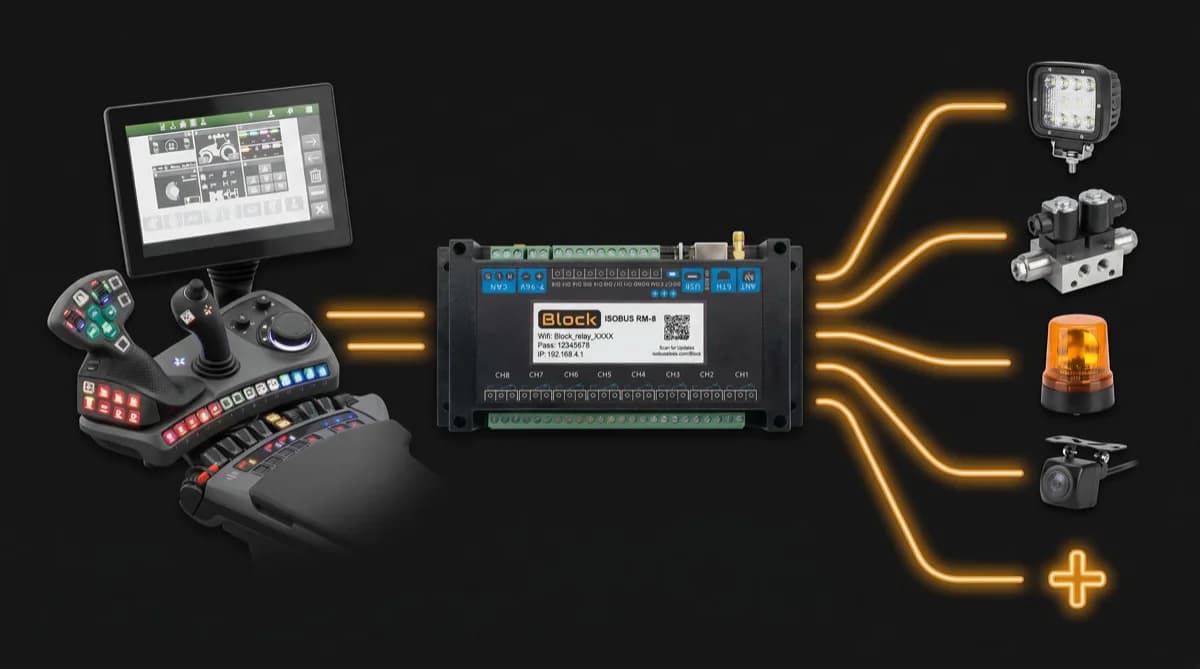
In short: If autoguidance engage or a hectare counter runs off a plain switched +12V line, an ISOBUS Block relay channel can switch that line from an AUX-N button. Wire the line through the channel's NO and COM terminals, set TOG or MOM on the tractor screen, and assign the channel in the AUX-N menu. Inputs that need 0–10V, PWM or a proportional signal are not a relay job.
You want to engage autoguidance from a button on the armrest, or start the hectare counter on a piece of equipment, without bolting in yet another controller box and running a new switch into the cab. If the function you want to trigger is activated by a simple switched +12V line (power on means engage, power off means disengage), you can drive it from an AUX-N button instead.
Here's what that setup looks like, and where it stops working. This is on/off relay switching. It engages autoguidance and starts a hectare counter cleanly. It does not produce a variable signal, so if the function needs a proportional or analog input, this is the wrong tool. We'll be specific about that line.
When a Switched +12V Line Is All You Need
Plenty of agricultural functions activate on a plain switched circuit. The receiving device watches one wire. When that wire sees +12V, the function is on. When the wire goes to ground or open, the function is off. No data, no signal shape, just power present or not.
Two common examples:
- Autoguidance engage. Some autoguidance and steering setups accept a remote engage input on a switched line. Apply +12V, the system arms or engages; drop it, it disengages. The actual steering is still done by the autoguidance system. You're just throwing its on/off switch from a different button.
- Hectare / area counters. A counter that logs worked area often starts and stops on a switched input tied to the implement being in work. Feed it +12V while you're working the field, cut it on the headland, and the count reflects real worked hectares. If the tractor has its own counter with a work-signal input, see how to trigger the tractor's worked area counter.
If your function works this way, a relay can switch that line. And if a relay can switch it, an AUX-N button can trigger it. That's the whole idea: the relay sits between the tractor's button and the device's switched input, and the operator presses a button they already have.
How the chain works
The control path is short and worth understanding before you wire anything:
| Step | What happens |
|---|---|
| 1 | You press an assigned armrest or joystick button (or a soft key on the screen) |
| 2 | ISOBUS carries that button event to the relay module over the CAN bus |
| 3 | The relay channel switches, closing the circuit on the device's switched +12V input |
| 4 | The device sees power on its input and engages (autoguidance arms, counter starts) |
The relay does one job: it makes or breaks a circuit. Everything downstream (what the autoguidance does, how the counter logs) is the receiving device's job, exactly as before. You haven't changed that device. You've changed what switches it on.
This is the same relay-switching principle behind work lights and solenoid valves. For the full picture of how ISOBUS routes a button press to an output, see the ISOBUS implement control guide.
Setting It Up with AUX-N
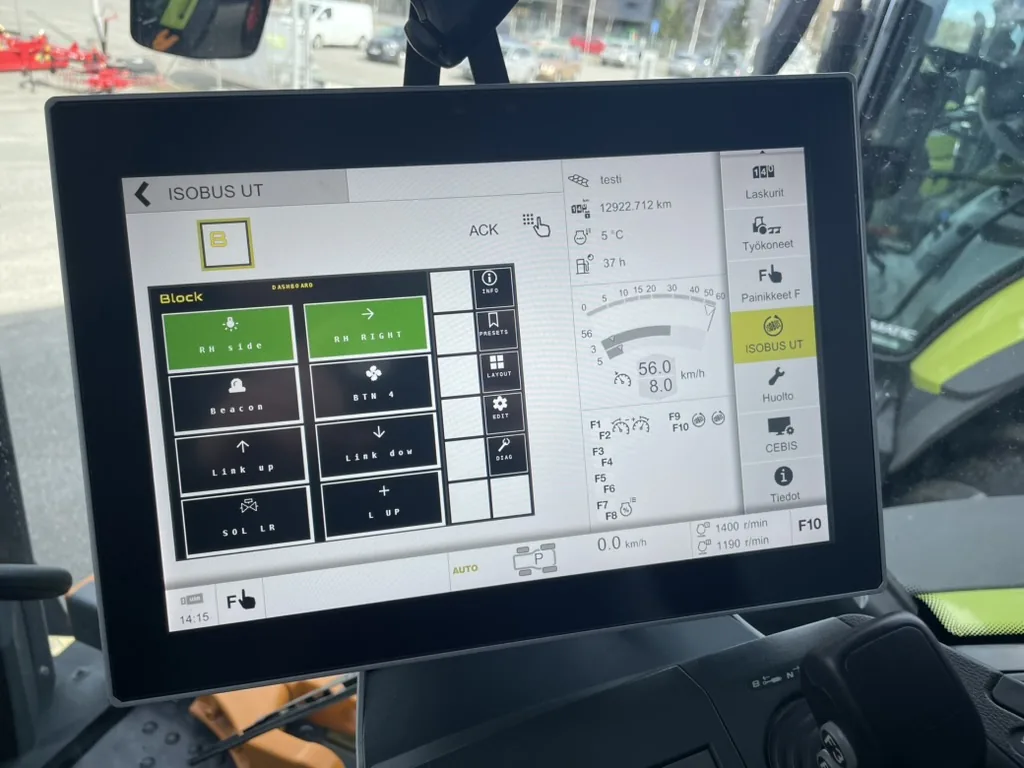
AUX-N (Auxiliary Input Type N) is the ISOBUS feature that lets you map a tractor's physical buttons to an implement function. With a relay module on the bus, each relay channel shows up as a function you can assign to a joystick trigger, an armrest switch, or any AUX-N-capable input on your tractor. Full detail on the assignment process is in the ISOBUS AUX-N complete guide.
For triggering autoguidance and hectare counting, the steps are:
- Wire the switched line to a relay channel. Run the device's switched +12V input through the normally-open (NO) and common (COM) terminals of one channel: say CH1 for autoguidance engage, CH2 for the hectare counter. Load power comes from your own +12V source, not the ISOBUS connection. The relay only switches it.
- Pick the mode on the tractor screen. Each channel runs in TOG (toggle) or MOM (momentary). For an engage that should stay on until you switch it off, use TOG: press once to engage, press again to disengage. For a function that should only be live while held, use MOM.
- Assign the channel to a button. Open your tractor's AUX-N menu and bind CH1 to whatever button you want. Do the same for CH2.
- Test from both the button and the screen. AUX-N buttons and the VT soft keys both control the same channel. Confirm the function engages and releases correctly from each.
Toggle or momentary for these jobs?
The mode you choose changes how the button feels in the cab:
| Function | Suggested mode | Why |
|---|---|---|
| Autoguidance engage | TOG | You want it to stay engaged hands-free until you switch it off |
| Hectare counter (full pass) | TOG | Counts continuously while the field is worked, off on the headland |
| Hectare counter (held-only) | MOM | Counts only while you hold the button, if you want manual control of every meter |
There's no single right answer. It depends on how you work. The point is that you set the behavior yourself on the screen, then assign it to the button that suits your hands. If you want a single press to handle more than one thing, you can group channels so one button switches both at once. More on relay control modes and grouping in control any device from your ISOBUS terminal.
Where This Does Not Fit: Functions Needing an Analog Signal
Here's the honest limit, and it matters more than the capability.
A relay switches a circuit on or off. That's all it does. It cannot produce a variable, proportional, or analog signal. There is no "60% on." There is on, and there is off.
So if the function you want to trigger needs anything other than a plain switched line, a relay module is the wrong tool:
- A variable voltage input (e.g. 0–10V to set a rate or position). A relay can't produce a sliding voltage.
- A PWM or proportional signal to set valve position, flow, or speed: not a relay job.
- A data message on its own bus expecting structured signals rather than raw power: out of scope for relay switching.
- An analog sensor-style input where the device reads a value, not a state. A relay gives it a state, not a value.
Some autoguidance and rate-control functions fall into this category. Before you wire anything, confirm how the device's input actually behaves. If the manual or the wiring says "switched +12V," "remote engage," or "ground-to-activate," a relay handles it. If it says "analog," "proportional," "0–10V," "PWM," or "variable," it does not, and no amount of relay configuration changes that.
This is not a limitation to work around. It's the line that tells you whether the tool fits the job. Honest answer up front saves you a wiring afternoon and a returned part.
Quick test: is my function relay-switchable?
| If the device input is… | Relay module? |
|---|---|
| Switched +12V (power = on) | Yes |
| Ground-to-activate (switched to ground) | Yes, wired through the relay accordingly |
| Remote engage / remote switch | Usually yes, confirm it's a simple switched line |
| 0–10V variable / analog | No |
| PWM / proportional | No |
| Bus message expecting a data value | No |
When in doubt, check whether the function already has a physical switch or button somewhere that just applies power. If a manual switch can do it, a relay can do it, and an AUX-N button can replace that switch.
Why Not Just Add Another Controller?
Because you'd be installing a second box, a second power feed, and a new switch into a cab that already has a screen, a joystick, and a working set of buttons. The tractor already provides the inputs. The relay module already shows up on the screen. Assigning one more function is a menu operation, not an install job.
For functions that genuinely need variable control, a dedicated controller is the right call. That's what they're built for. But for "apply +12V to engage," a relay channel and an AUX-N button do the same job with hardware you've mostly already got. Whether your tractor supports AUX-N at all is worth confirming first; the ISOBUS compatibility guide covers how to check.
Frequently Asked Questions
Can I engage autoguidance from an AUX-N button?
Yes, if your autoguidance system accepts a remote engage on a switched +12V line. Wire that input through a relay channel, assign the channel to a button in your tractor's AUX-N menu, and pressing the button engages the system. If the autoguidance instead needs a variable or analog signal to engage, a relay can't drive it. Check how the engage input behaves before wiring.
How do I start a hectare counter from the tractor's buttons?
If the counter starts on a switched input tied to "in work," run that input through a relay channel and assign the channel to an armrest or joystick button. Set the channel to toggle (TOG) so one press starts the count and another stops it, or momentary (MOM) if you want it to count only while held. You can also switch it from the tractor screen.
What's the difference between switched and analog inputs?
A switched input only cares whether power is present: on or off. An analog input reads a value across a range, like 0–10V or a proportional signal. A relay module can switch a circuit on and off, so it handles switched inputs. It cannot produce a sliding value, so it cannot drive an analog input.
Can a relay module produce a variable or proportional signal?
No. A relay opens or closes a circuit: on or off, nothing in between. If a function needs a variable voltage, PWM, or proportional signal to set a rate, position, or speed, a relay is the wrong tool and a dedicated controller is needed instead.
Do I need an extra controller to trigger these functions?
Not if the function activates on a switched +12V line. A relay module on the ISOBUS bus gives you the switched output, and AUX-N lets you trigger it from buttons the tractor already has: no second controller, no new cab switch. A dedicated controller is only needed when the function requires variable or analog control.
Need an ISOBUS relay module for triggering switched functions like autoguidance engage or a hectare counter? ISOBUS Block provides 8 relay outputs (CH1–CH8), each set to toggle or momentary and controlled from your tractor's Virtual Terminal screen and AUX-N buttons. It switches circuits on and off. It does not produce analog or proportional signals.