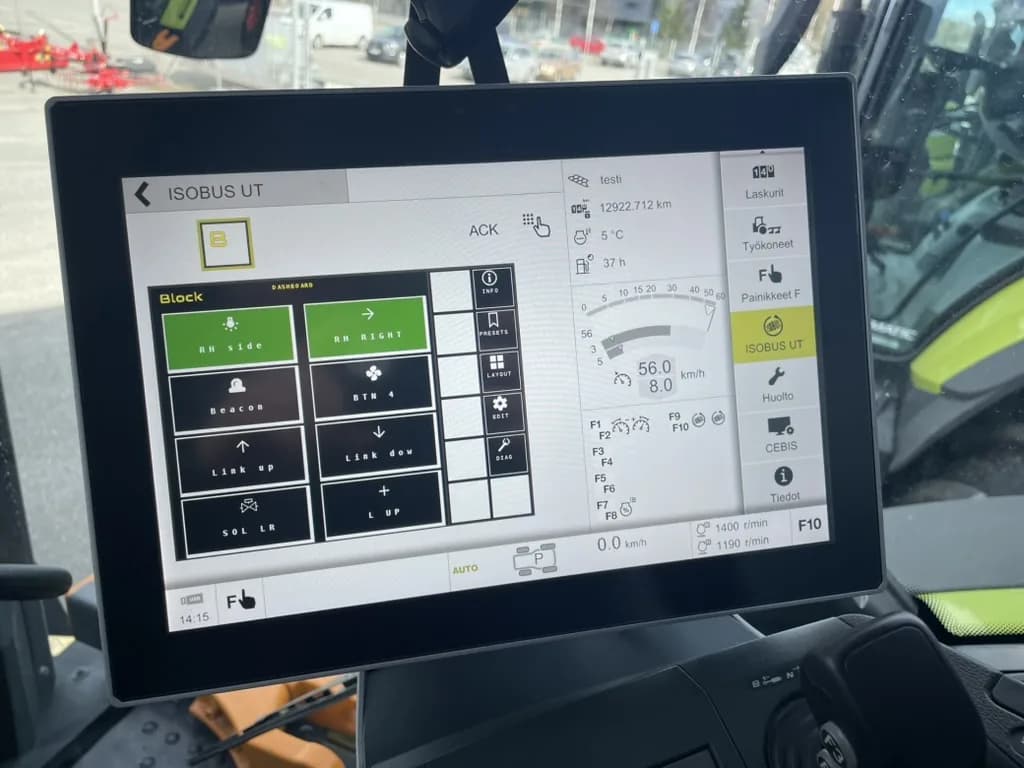
To check whether your tractor is an ISOBUS tractor, look at three things: a socket at the back, a socket in the cab, and the screen. Five minutes with the tractor running is enough. After that come what ISOBUS lets you control from the cab and the compatibility problems you will actually run into.
ISOBUS is the common name for ISO 11783, the standard that lets a tractor and an implement from different brands talk over one cable. The implement sends its controls to the tractor's screen, and you run it from there. No extra monitor for every machine you hitch up.
The three signs your tractor has ISOBUS
An ISOBUS tractor has at least two of these, and usually all three. Do not confuse the ISOBUS sockets with the 3-pin, 7-pin and signal sockets next to them.
| Sign | Where to look | What it tells you |
|---|---|---|
| Rear external ISOBUS connector | Back of the tractor, usually near the hydraulic couplers. A round 9-pin socket under a cap. Some tractors have a front one too. | ISOBUS implements plug in here. |
| In-cab ISOBUS connector | Inside the cab, often on the right-hand pillar or near the armrest. A smaller round 9-pin socket. | Terminals and cab-mounted ISOBUS devices plug in here. |
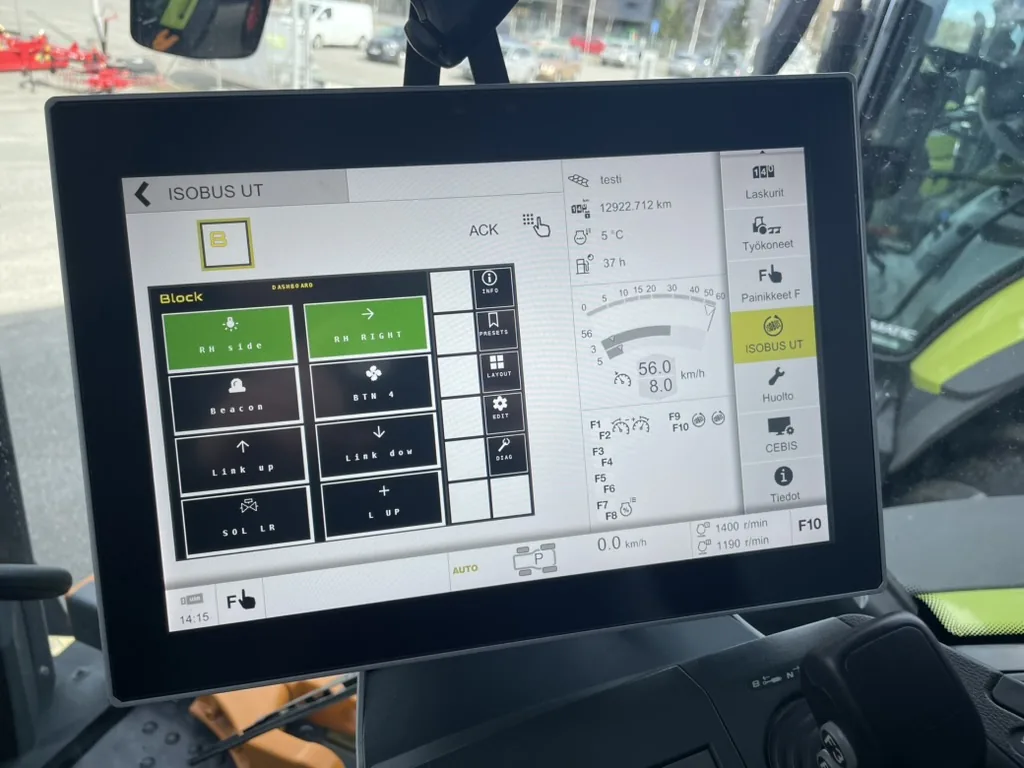
| ISOBUS terminal (UT or VT) | The cab screen. Look for a menu or app called ISOBUS, UT (Universal Terminal) or VT (Virtual Terminal). | Something can show implement controls. Without it, the sockets have nothing to talk to. |
The two sockets are standardised under ISO 11783-2, so they look the same on a Fendt, a John Deere or a Valtra. Pin layouts for both are in the ISOBUS connector pinout guide.
What each combination means
- Socket plus terminal: a working ISOBUS tractor. Plug in an ISOBUS implement and its screen loads on the terminal.
- Socket but no ISOBUS menu on the screen: the wiring is there but there is no terminal to use it. Check with the dealer whether the screen needs an ISOBUS activation, or add a terminal (more on that below).
- Terminal but no rear socket: rare, but it happens on tractors specced for front or cab devices only. Ask the dealer what can be retrofitted.
- Neither: not an ISOBUS tractor. See the section on tractors without ISOBUS further down.
Does it have AUX-N?
Having ISOBUS tells you the implement shows up on the screen. AUX-N tells you whether you can also run it from your hands.
AUX-N (auxiliary control, new type) lets you assign implement functions to the tractor's own joystick and armrest buttons. You pick a function, you pick a button, the tractor remembers it. Fold the markers with the joystick thumb button instead of reaching for the screen.
How to check:
- Plug in any ISOBUS implement and let its screen load.
- Open the terminal's ISOBUS settings and look for AUX, AUX-N, Auxiliary functions or Auxiliary assignment.
- If the menu lists the implement's functions on one side and the tractor's buttons on the other, you have AUX-N.
- If only AUX-O is listed, the tractor has the older system. Assignments are more rigid and many newer implements do not offer AUX-O functions at all.
AUX-N went mainstream on new tractors in the mid-2010s. No AUX-N does not mean no control: every ISOBUS implement can still be run from the soft keys on the screen. The AUX-N complete guide walks through the assignment screens.
Which tractors have ISOBUS
Every major brand sells ISOBUS tractors. What varies is which series get it, whether the terminal is standard or an extra on the price list, and what the screen is called. The table below uses the brands' own published pages. Where a brand does not say whether ISOBUS is standard, we have not guessed.
| Brand | Terminal name(s) | ISOBUS as standard or option | Notes |
|---|---|---|---|
| John Deere | G5 and G5Plus Universal Display, Generation 4 CommandCenter | Check with the dealer | Implements run in the display's ISOBUS VT app. Deere lists support for VT2 to VT4 implements. |
| Fendt | Varioterminal, FendtONE | Check with the dealer | Fendt describes ISOBUS as plug and play: plug into the ISOBUS socket and the implement's screen appears on the terminal. |
| Case IH | AFS Pro 700, AFS Pro 1200 | Check with the dealer | Case IH describes both displays as ISO 11783 virtual terminals for any brand of implement. |
| New Holland | IntelliView IV, IntelliView IV Plus, IntelliView 12 | IntelliView IV Plus factory fit on T5, T6 and short-wheelbase T7 (North American page). Elsewhere, check with the dealer. | IntelliView IV is also sold as an aftermarket display. |
| CLAAS | CEMIS 1200 | Check with the dealer | ISOBUS UT control on ARION and AXION. CLAAS states AUX-N assignment to the multifunction lever. |
| Valtra | SmartTouch | Check with the dealer | Valtra describes the SmartTouch armrest as an ISOBUS Universal Terminal. |
| Massey Ferguson | Datatronic 5, Fieldstar 5 | Datatronic 5 standard on the MF 8700 S. Other series: check with the dealer. | Implements run through the UT. MF lists up to 12 AUX-N assignments on its Multipad controls. |
| Deutz-Fahr | iMonitor | Option: ordered from the factory or retrofitted | Available in several screen sizes across generations. |
| Kubota | K-Monitor (7 inch), K-Monitor Pro (12 inch) | Check with the dealer | Kubota states full ISOBUS compatibility for the M7 series. |
The name on the screen matters less than the menu: if it has an ISOBUS, UT or VT section, it is a terminal. And on a used tractor, check the machine, not the brochure. The same model can leave the factory with or without the terminal.
ISOBUS ready vs ISOBUS prepared
Brochures and used-tractor listings use two phrases that sound alike and are not.
ISOBUS ready means the tractor has it all: the socket, the wiring behind it, and a terminal with UT (Universal Terminal) in the cab. Plug in an ISOBUS implement and its screen loads.
ISOBUS prepared, in German listings often "ISOBUS vorgerüstet", means part of it is there. Usually the wiring or the socket is fitted, and the terminal is missing or listed as an option. The socket on its own does nothing, because nothing in the cab can show the implement's controls.
| ISOBUS ready | ISOBUS prepared | |
|---|---|---|
| Rear socket and wiring | Yes | Usually |
| Terminal with UT | Yes | Missing or optional |
| Runs an ISOBUS implement as delivered | Yes | No, it needs a terminal first |
Makers do not use the terms consistently, so treat them as a reason to ask, not as a spec. Before you buy an implement for an "ISOBUS prepared" tractor, check the three signs at the top of this page and ask the seller exactly what is fitted. If the screen has no ISOBUS or UT menu, plan for a terminal. ISOBUS terminal solutions covers the options.
Compatibility lists: check a specific tractor and implement
Check the terminal maker's compatibility list and the implement maker's spec sheet. Look up your tractor and your implement by manufacturer and model, and see which ISOBUS functions each one supports: UT, AUX-N, Task Controller and so on. If both sides list the same function, that function should work between them. If the implement needs Task Controller section control and the tractor only lists UT, the implement will load and run, but not switch sections automatically. It is the fastest way to answer "will this pairing work" before you buy.
What ISOBUS lets you control
Implements with their own ECU
A sprayer, spreader, baler or seed drill with an ISOBUS ECU (its own control computer) sends its interface to your terminal when you plug it in. You get its buttons, settings and alarms on the tractor screen, and with AUX-N, on your joystick. With a Task Controller on the terminal, sprayers and spreaders can also switch sections and vary rate from a map. A spreader or drill that holds its rate to ground speed reads that speed from the tractor, and how much the tractor sends depends on its tractor ECU class. The ISOBUS implement control guide covers what this looks like in the cab.
Switched outputs you add yourself
Plenty of things you want to switch have no ECU at all: a work light on the loader, a diverter valve that turns one spool into two functions, a beacon, a hopper lid motor, a locking solenoid. These are plain 12 V or 24 V loads that only need switching on and off.
A relay module that speaks ISOBUS puts them on the same screen. ISOBUS Block is one: it plugs into the in-cab or rear ISOBUS connector, shows up on the terminal as eight buttons, and switches up to 10 A per channel. You wire the loads, name the buttons, pick toggle or momentary, and assign them to joystick buttons if the tractor has AUX-N.
If your tractor has no ISOBUS
You can still get there, but the first step is the terminal, not the implement. Whether that spend pays off on a smaller farm is covered in is ISOBUS worth it on a small farm.
Aftermarket universal terminals are sold by several ISOBUS electronics makers. They mount in the cab and give you the screen. The tractor side then needs the ISOBUS wiring to connect that screen to a socket, which is dealer work on most tractors. ISOBUS terminal solutions covers the options and what each one gives you.
A relay module, ISOBUS Block included, does not add ISOBUS to a tractor. It needs an ISOBUS terminal to show its buttons on. If you are looking at retrofitting the implement side instead, the ISOBUS retrofit guide is the page for that.
Compatibility problems you will actually meet
ISOBUS mostly works. These are the cases where it does not work the way the brochure suggests.
Terminal brands behave differently
Every terminal lays out the ISOBUS menus its own way. The AUX-N assignment screen, the list of loaded implements and the setting to delete stored screens sit in different places on a Fendt, a John Deere and a CLAAS. An implement that feels natural on one brand can feel clumsy on another. Not a fault, but it catches people moving between tractors.
Older terminals and object pools
An implement's screen layout is called an object pool. The terminal stores it after the first upload so it loads faster next time. Older terminals have less room for stored pools and support older VT (Virtual Terminal) versions. Two things follow:
- After many different implements, an older terminal can run out of space and refuse a new one. Deleting pools you no longer use fixes it.
- An implement built only for a newer VT version may not load on an old terminal. John Deere's own advice for this case is to ask the implement maker for a software version that matches the display.
AUX-N vs AUX-O on older tractors
Early ISOBUS tractors often have AUX-O only. The implement works from the screen, but its functions will not appear on the joystick unless the implement also offers AUX-O functions. Check the AUX menu before you plan around button control.
Power at the socket
A device plugged into an ISOBUS socket takes its own power from the socket's ECU power pins. If a device shows no sign of life, measure between ECU power and ECU ground with the key on before blaming the device. No voltage there is a tractor-side fault, and the dealer has to look at why.
For fault codes, bus termination and step-by-step checks, see the ISOBUS troubleshooting guide.
Frequently Asked Questions
How do I know if my tractor is ISOBUS?
Look for a round 9-pin socket at the rear, usually near the hydraulic couplers, and a smaller one inside the cab. Then open the cab screen and look for a menu called ISOBUS, UT or VT. Socket plus menu means you have an ISOBUS tractor.
Are all new tractors ISOBUS?
No. Most mid-range and larger tractors from the major brands offer it, often from around 2010 onward, but on many series the terminal is an option rather than standard. Smaller and entry-level tractors often ship without it. Check the actual machine or ask the dealer for its spec.
Is ISOBUS compatible between brands?
Yes, that is the point of the standard. An implement from one brand loads its screen on another brand's terminal. The connector and the basic screen control are the same across brands. Extra functions such as AUX-N and Task Controller depend on what both sides support, which the terminal maker's compatibility list and the implement maker's spec sheet show.
What does ISOBUS ready mean?
On a tractor, it means the socket, the wiring and a terminal with UT are all fitted, so an ISOBUS implement runs as soon as you plug it in. "ISOBUS prepared" usually means the wiring or socket is there but the terminal is not. Implements use the term too, with a slightly different meaning: see the next question.
What is an ISOBUS-ready implement?
An implement with its own ISOBUS ECU that plugs into the tractor's ISOBUS socket and shows its controls on the tractor screen. Some manufacturers also use "ISOBUS-ready" for implements that need an extra ECU or kit to get there, so ask what is included. The ISOBUS vs non-ISOBUS comparison goes into the difference.
Does ISOBUS Block work with my tractor?
If your tractor has an ISOBUS connector and a Virtual Terminal, yes. It works on any ISOBUS tractor with a VT, whatever the brand. For joystick or armrest control, the tractor also needs AUX-N. Without AUX-N you switch the channels from the screen. John Deere is a common question because Deere publishes its own compatibility chart for implements. In practice the module has been tested on older and newer John Deere displays, and customers run it on John Deere tractors every day.
Need an ISOBUS relay module for controlling solenoids, work lights, or hydraulic valves? ISOBUS Block provides 8 relay outputs controlled directly from your tractor's Virtual Terminal display.