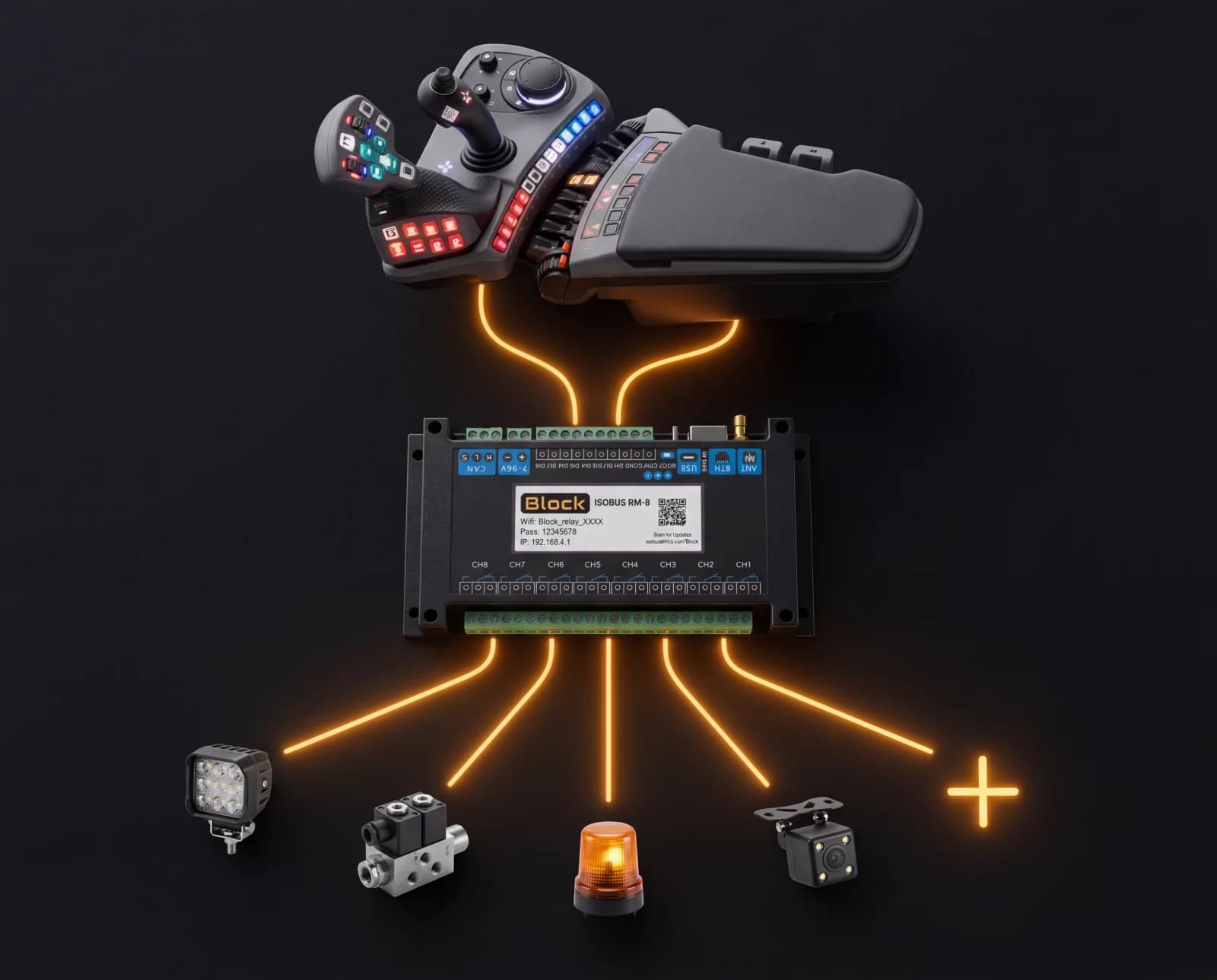
In short: You wire the relay outputs to your own 12 V or 24 V loads, such as work lights, a diverter valve or sprayer section solenoids, and plug one ISOBUS cable into the in-cab or rear connector. Channel names and icons you set on the tractor screen also show up in the AUX-N assignment menu. The bare module is IP20, so outside the cab it goes in an IP65 enclosure.
Key takeaways
- Product: ISOBUS Block, an 8-channel relay module that registers as an AUX function on any ISOBUS tractor.
- Price: see the shop page.
- Switching: 10 A per channel, 250 V AC / 30 V DC max, 8 independent relays with NO / COM / NC terminals.
- Control: Virtual Terminal soft keys on the tractor screen, plus AUX-N assignment to any joystick or armrest button.
- Buttons: 8 customizable soft buttons in the Virtual Terminal, each with its own label and icon.
- Power: 7–36 V DC over the ISOBUS connection. No separate power wiring.
What ISOBUS Block is
ISOBUS Block is an 8-channel auxiliary relay module that plugs into the tractor's ISOBUS network and registers itself as an AUX-N function. Once it's on the bus, the operator sees an 8-channel control screen on the existing Virtual Terminal. No extra display, no proprietary controller, no laptop required for setup.
What makes it different from a third-party switchbox: the buttons you already have do the work. Channel labels and icons are edited from the tractor screen and appear in both the VT main grid and the tractor's AUX-N assignment menu. The module is a building block: you wire the relay outputs to whatever 12 V or 24 V loads you want to switch, then assign the channels to buttons that fit your workflow. That makes it a natural fit whether the implement is ISOBUS-ready or you're retrofitting ISOBUS onto an implement that never came with electronic control. If the switchbox you have in mind is one you would build yourself, the build-or-buy comparison of ISOBUS Block and a DIY relay box sets the two routes against each other.
Specs
| Spec | Value |
|---|---|
| Relay channels | 8, each with NO / COM / NC terminals |
| Max current per channel | 10 A |
| Max switching voltage | 250 V AC / 30 V DC |
| Supply voltage | 7–36 V DC (via the ISOBUS connection) |
| Housing | DIN-rail ABS, IP20 (in-cab or panel mount) |
| Dimensions | 90 × 175 mm |
| Weight | 500 g |
| Operating temperature | −30 °C to +50 °C |
| Protocol | ISOBUS AUX-N, ISO 11783 |
| Channel modes | Per-channel TOG (toggle) or MOM (momentary) |
| VT buttons | 8 customizable soft buttons, each with its own label and icon |
| Warranty | 5 years |
The bare module is IP20, designed for in-cab or panel mounting. For outdoor or implement-side use, the module belongs in an IP65 enclosure.
Use cases
The 8 channels are independent. Use them for whatever combination of loads fits your work. Three common ones:
Front loader third function
Wire a diverter valve solenoid to a relay channel. Assign that channel to a joystick button. Press the button, the diverter opens, your existing first/second hydraulic function now drives a third tool: grapple, bale spike, log clamp.
Work-light groups
Wire your front, side, and rear work lights to separate channels. Set the channels to toggle (TOG) mode. Assign them to armrest buttons. Group two or three channels under a single button if you want one press to switch a whole set on at once.
Solenoid valves on sprayers and spreaders
Wire each section's solenoid to its own channel. Switch sections on and off from the screen or from buttons. The channels are independent, so you can mix work-light toggles and momentary valve outputs on the same module.
How it works in plain language
- Mount the module on a DIN rail in the cab, a panel, or your own IP65 enclosure.
- Wire your loads to the relay terminals (NO, COM, NC per channel).
- Plug an ISOBUS cable from the module into the tractor: either the in-cab ISOBUS connector or the rear external one, your choice. Power and CAN both ride that single connection.
- The module appears on the Virtual Terminal as
CH1–CH8. Rename channels, choose icons, set each one to TOG or MOM. - Open the tractor's AUX-N menu and assign channels to whichever joystick or armrest buttons you prefer.
- Drive.
WiFi is built in but optional. It exists for diagnostics and firmware updates: viewing output state, checking software version, updating over the air. All button assignment and channel behaviour is set on the Virtual Terminal, not over WiFi. Common setup questions are answered on the FAQ page.
Frequently Asked Questions
What is the price of ISOBUS Block?
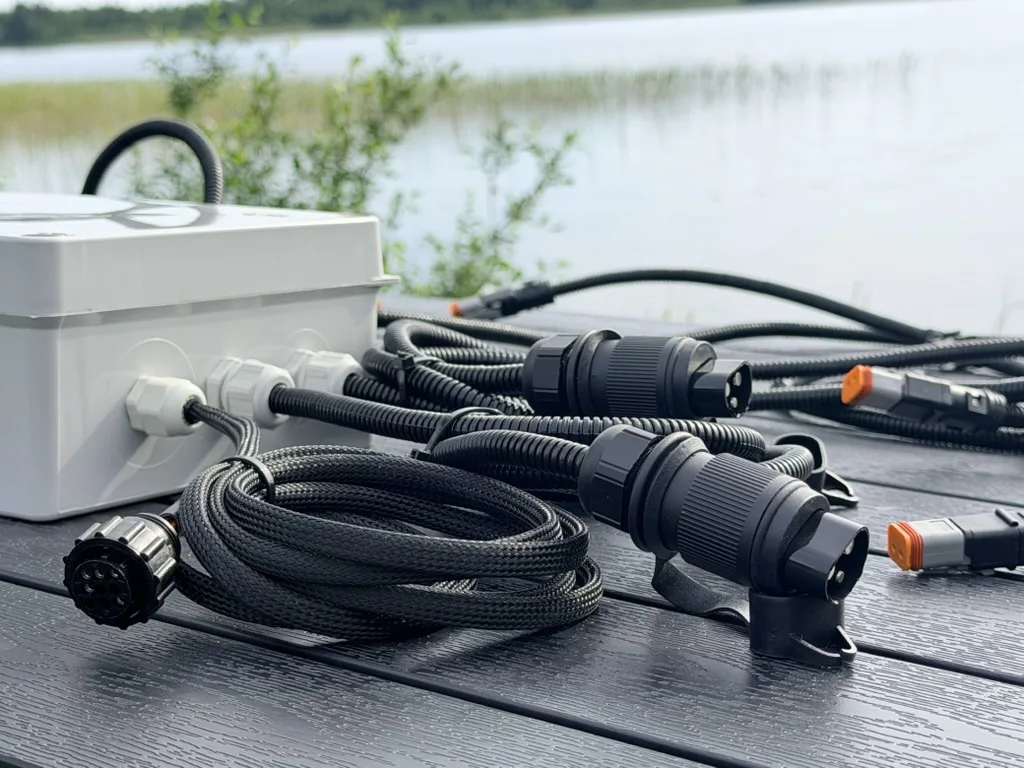
The current price for the 8-channel module is on the shop page. You wire your own loads to the relay terminals and supply the ISOBUS cable. Two optional connector kits are offered alongside it, and which one you need follows from where the Block is mounted. In the cab: the In-Cab Connector Kit, with the 9-position plug, cable clamp and contacts for the in-cab socket. On the implement: the External Connector Kit, the standard ISO 11783-2 ISOBUS connector that plugs into the tractor's external rear or front socket, sealed to IP67 when mated. Both ship their contacts loose for you to crimp onto your own cable. For the implement side, the ISOBUS cable is also sold as an add-on: bare HELUKABEL ISOBUS PUR in 3, 6 or 10 m, which fits the External Connector Kit's plug.
Will ISOBUS Block work with my tractor?
It works with any tractor that has an ISOBUS in-cab or rear external connector, the standard 9-pin sockets defined by ISO 11783. That covers Fendt, Valtra, John Deere, Case IH, CLAAS, Massey Ferguson, New Holland and other ISOBUS-compliant brands. Soft-key control on the Virtual Terminal works on any ISOBUS tractor; assigning channels to armrest buttons needs a tractor that supports AUX-N. For the brand-by-brand breakdown, see the ISOBUS compatibility guide.
Does the module need an internet connection?
No. The module runs entirely on the tractor's ISOBUS network. WiFi is built in but optional. It's used for diagnostics and firmware updates, not for normal operation. Every button assignment and channel setting happens on the tractor screen.
Can ISOBUS Block replace a hydraulic joystick block?
It replaces the control side of one: the switches, the wiring, the auxiliary switchbox. The module switches relays; the relays drive the same solenoid valves your existing hydraulic block uses. Hoses, cylinders, and the hydraulic block itself stay as they are. The chain is: button press → relay switches → solenoid opens → oil moves → cylinder extends.
What's the power supply?
7–36 V DC, fed through the ISOBUS connection itself. There is no separate power wiring. The same plug carries CAN bus and power.
How many things can I run from it?
Up to 8 independent loads, 10 A each. Channels can also be grouped. Link two or three channels under one button so a single press switches a whole set together.
Related reading
- ISOBUS AUX-N Complete Guide: how joystick and armrest assignment works
- ISOBUS Virtual Terminal Explained: the screen the module appears on
- ISOBUS Terminal Solutions: broader context on VT-based control
- ISOBUS Connector Pinout Guide: the 9-pin wiring
Ready to put 8 outputs on your armrest? Order ISOBUS Block or read the installation docs. Questions on a specific setup? Get in touch.