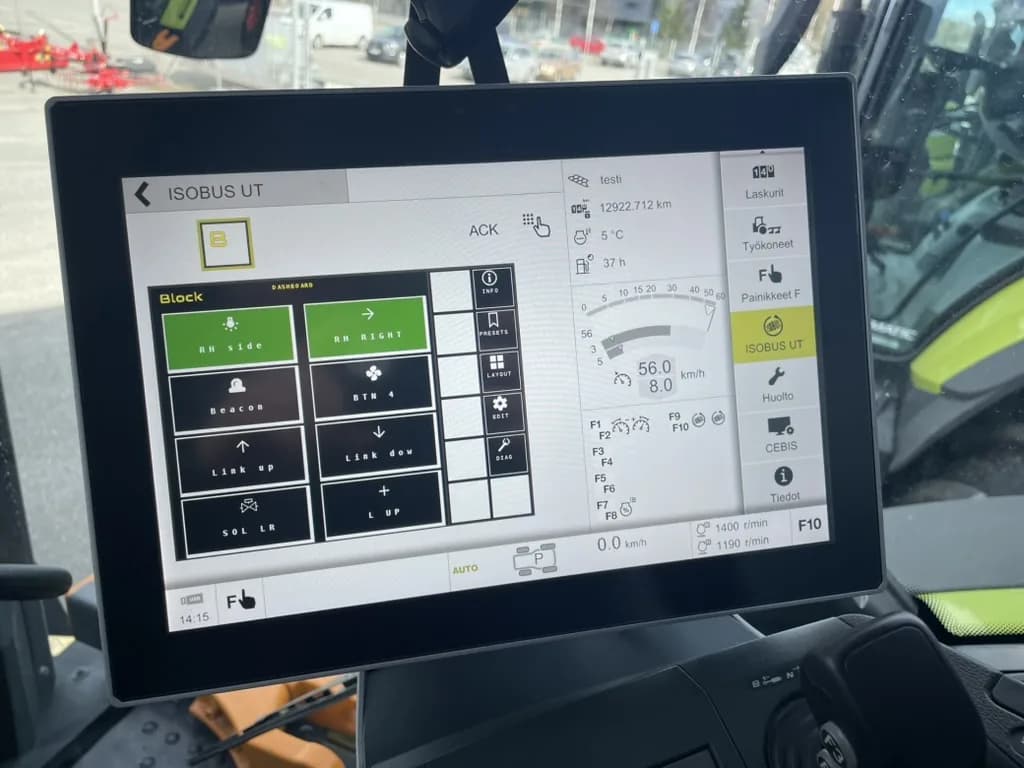
In short: An ISOBUS retrofit usually means retrofitting the implement, not the tractor. ISOBUS Block mounts on the implement in a weatherproof enclosure you supply, one cable runs to the tractor's ISOBUS connector, and the implement's functions show up as buttons on the Virtual Terminal. The tractor needs a Virtual Terminal and an ISOBUS connector already. The module does not add ISOBUS to a tractor.
Your old seed drill has no switch in the cab. You want to run the work lights, fold the markers, and flip a couple of solenoid valves from your seat, without dragging a loom through the back window. That's the situation behind almost every search for an "ISOBUS retrofit kit." The real question underneath: how do I get my implement's functions onto the screen the tractor already has?
This guide covers what an ISOBUS retrofit actually involves, what it costs, where the module goes, what wiring you build yourself, and where the honest limits are. Here's the part most people miss up front: in most cases you're not retrofitting the tractor. You're retrofitting the implement.
What an ISOBUS retrofit actually means
The tractor already has what you need: a Virtual Terminal (the screen in the cab) and an ISOBUS connector on the back. What's missing lives on the implement. The drill, the sprayer, or the trailer has no electronics that talk to the tractor. That is all a non-ISOBUS implement is, and the side-by-side against an ISOBUS one shows exactly what the retrofit changes.
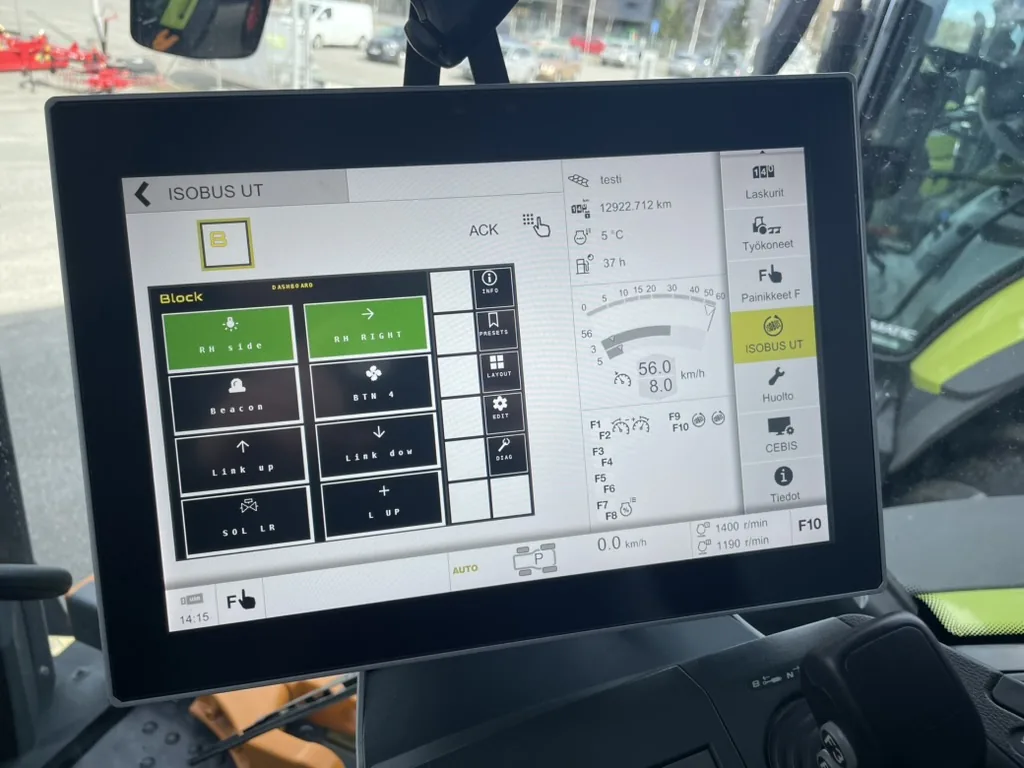
That's where the retrofit happens. You add a relay module to the implement that speaks ISOBUS. ISOBUS Block is an 8-channel relay module built for exactly this:
- It mounts on the implement, inside an IP65 enclosure you supply. The bare module's own DIN-rail housing is IP20, indoor-rated only.
- One cable runs to the tractor's ISOBUS connector.
- The implement's functions show up as buttons on the Virtual Terminal, named and iconed the way you want them.
From there you switch up to eight outputs, CH1 through CH8, straight from the tractor screen. If your tractor supports AUX-N, you also assign each channel to a physical button on the joystick or armrest. One cable in, eight loads out. No second display, no proprietary software. An ISOBUS I/O gateway is the heavier route for older implements that also need sensor readings or proportional outputs on the screen. The comparison of ways to add outputs to an ISOBUS tractor lines up the switch box, a DIY relay box and the module.
Whether it works with your specific tractor is a separate question, answered further down. This post is mostly about the other half: how you actually fit it.
Fendt, John Deere, New Holland: does the brand matter?
Short answer: no. The ISOBUS connector and the protocol are the same on every brand: one 9-pin socket under ISO 11783, the same pins, the same messages, whether it is a Fendt, a John Deere, a New Holland, a Case IH or a Valtra. There is one ISOBUS Block module, not a Fendt version and a John Deere version. Which terminal each brand uses is in the brand-by-brand ISOBUS tractor table.
What the retrofit gives you on the implement
On the implement, the module switches relays. Relays switch current to solenoid valves, work lights, beacons, and other 12 V or 24 V loads. Each channel can be set to TOG (on/off, latching) or MOM (on only while pressed). Everyday examples:
- Seed drill: fold the markers, switch the work lights, run the fill auger. For the folding side, see Planter fold control from the ISOBUS screen.
- Sprayer: lighting, rinse circuit, diverter valves. For running boom sections from joystick buttons, see Sprayer boom control over AUX-N.
- Balers and harvest machines: work lights, road lighting, extra functions.
- Forage wagon: pickup, boom, rear door, conveyor floor, buzzer. That is all eight channels, worked through on a wagon with no ISOBUS of its own.
One point of honesty: the module replaces the control side only. It switches the relay, the relay switches the solenoid, and from there your hydraulics take over exactly as before. Hoses, cylinders, and oil stay as they are. ISOBUS Block does not drive a cylinder directly. It just means you switch the valve from the screen or the joystick instead of from a rocker switch bolted to the implement.
Because each channel gets its own name and icon that you set from the terminal, you don't end up with eight blank buttons. Rename CH3 to DIVERTER, give it a valve icon, and that's what shows up. Both on the main screen and in the AUX-N assignment menu.
How buttons work on the terminal
Setup happens on the tractor's Virtual Terminal. Press the EDIT soft key on the module's main screen; the buttons turn blue and go into edit mode. Tap the button you want to configure. You type its name (up to 8 characters), pick an icon, choose which relay channels it switches (one, or several grouped together), and set the mode: TOG for latching, MOM for momentary. Exit edit mode and it's saved.
The 8-channel module publishes 18 AUX-N functions in all: one per button, one Arm Auto per automation tile, plus a latching STOP and a preset quick-change function. Assign each one to a joystick trigger or armrest button through the tractor's own AUX-N assignment menu. Once bound, pressing that button switches the relay directly. The name and icon you set on the VT are what the assignment menu shows, so you bind DIVERTER to a trigger, not a bare channel number.
For the deeper how of AUX-N binding, see the ISOBUS AUX-N complete guide.
Where the module actually goes: cab vs. implement mount
Two sensible places to put the module. The right choice depends on where your loads are.
Cab mount. The module lives inside the cab, on a DIN rail or bolted to a panel. A short ISOBUS cable runs to the in-cab ISOBUS connector. The relay-side wires leave the module and go where the loads are. Good for a tractor with a set of extra outputs the operator wants to control from the screen: roof-mounted work lights, a beacon, a couple of solenoids on a permanently mounted attachment. The module never sees weather. The bare IP20 housing is fine.
Implement mount. The module lives on the implement, inside a weatherproof enclosure you supply, and plugs into the tractor's rear (or front) external ISOBUS connector with a single cable. This is the retrofit case: the implement carries its own loads, and every one of them is a short run from the module rather than a long run back through the cab. Swap tractors and the whole rig follows the implement. The name, icon, and mode for each channel travel with the module. On the next tractor everything comes back the way you left it, though AUX-N assignments are re-bound once on the new tractor's own menu.
For a related migration story, Replace the cab-mounted switch box with ISOBUS AUX-N walks through swapping a dash toggle panel for a module on the implement. For a trailer with its own hydraulic solenoids, trailer hydraulics on the ISOBUS terminal shows the same implement-mount pattern.
The wiring you build yourself
There is no pre-made harness. The two connector kits ship the mating ISOBUS plug with loose contacts and a pinout diagram. You cut the cable to whatever length the machine needs and crimp the contacts on.
On the implement side (external kit). The kit is the standard ISO 11783-2 female cable connector (Amphenol AHDP06-24-91S-BS1-K06S) with contacts supplied loose. It mates with the tractor's rear or front external ISOBUS socket and is IP67-sealed when locked. Six of the nine pins are used: pin 2 is ECU ground, pin 4 is ECU power (7 to 36 V) to run the module, pin 8 is CAN H, pin 9 is CAN L. Pin 3 carries the tractor's fused 60 A supply, which lands on the module's COM bus and feeds the loads, and pin 1 is the chassis ground for the load return. Cable diameter 14 to 18 mm.
On the cab side (in-cab kit). The kit is a TE 9-position circular plug with a cable clamp and nine loose 18-16 AWG tin sockets. It mates with the tractor's in-cab ISOBUS connector. Four pins do the work: pin 2 is CAN L, pin 4 is CAN H, pin 7 is BAT+ (7 to 36 V), pin 9 is GND. Load power is separate here; feed the COM bus from your own +12 V or +24 V source through your own fuse.
For the crimp itself, the in-cab kit takes a standard 18-16 AWG crimp tool. If you don't own one, that's the one thing to sort out before you start. Both kits include the pinout diagram and crimping instructions.
For both connectors side by side with the diagrams, see the ISOBUS connector pinout guide.
What your tractor needs first
For the retrofit to work, the tractor needs two things:
- A Virtual Terminal, an ISOBUS-capable screen in the cab.
- An ISOBUS connector, usually on the rear, and up front too if you run front implements.
Most mid-range and up tractors built from around 2010 onward have both as standard. AUX-N, which lets you assign channels to physical buttons, went mainstream on new tractors in the mid-2010s. Without AUX-N the module still works, you just switch from the screen soft keys instead of the armrest.
A quick way to check what you have, with the full version in how to tell if your tractor has ISOBUS:
- Look for the socket. A 9-pin circular connector, usually under a screw-on cap. Rear ISOBUS is often near the hydraulic couplers on the back of the tractor. The in-cab connector is inside the cab, often on the right-hand pillar or under the armrest.
- Open the VT settings. Turn the tractor on and go to the ISOBUS or Virtual Terminal menu. It will show the VT version and, on most brands, a list of currently connected working sets.
- Try the AUX-N menu. ISOBUS settings → AUX-N or Auxiliary Functions. If the menu exists and lists your tractor's own inputs, you have AUX-N. If only AUX-O is listed, AUX-N isn't supported.
- Look up the model. Check the terminal maker's compatibility list and the implement maker's spec sheet for which ISOBUS functionalities each one supports.
- Ask the dealer. Some tractors ship with ISOBUS wired but not enabled. Common on older John Deere and some entry-level configurations.
Here's the honest limit: if your tractor has no ISOBUS at all, no connector, no terminal, then ISOBUS Block does not add ISOBUS to it. The module speaks ISOBUS; it doesn't create it. Converting a non-ISOBUS tractor to ISOBUS is a dealer-level job, not a bolt-on retrofit. Check for the socket first.
What does an ISOBUS retrofit cost?
The core is the module. Two optional connector kits let you crimp your own cable to length; everything else on the machine is your own wiring. Current pricing for the module and both kits is on the ISOBUS Block product page. For how that total stacks up against a panel of toggles and relays you wire yourself, see the build-or-buy comparison of ISOBUS Block and a DIY relay box.
| Item | What you get |
|---|---|
| ISOBUS Block module | The 8-channel relay module in a DIN-rail housing (IP20, indoor rated). You supply the ISOBUS cable and, for outdoor use, your own enclosure. |
| In-Cab Connector Kit (optional) | The 9-pin plug (TE 206708-1) that mates with the in-cab ISOBUS connector, a cable clamp, and nine loose 18-16 AWG contacts. |
| External Connector Kit (optional) | The standard ISO 11783-2 female ISOBUS connector (Amphenol AHDP06-24-91S) for the tractor's external socket, contacts included. IP67 when mated. |
For a working retrofit, add what the kits don't include:
- ISOBUS-spec cable to length. You choose how long, based on where the module is mounted.
- A weatherproof enclosure, if the module lives outside the cab. Any IP65 or better box big enough to fit the 90 × 175 mm module.
- Load-side wiring. Standard 12/24 V wire from each
NOandCOMterminal to the load, sized for the current, up to 10 A per channel. - A crimp tool, if you don't own one. A standard 18-16 AWG tool works for the in-cab kit.
- Fuses. On a cab-mount install, fuse the +12 V or +24 V feed to the
COMbus per your existing wiring practice. On an implement-mount install, the tractor's rear connector is already fused at 60 A by the tractor itself.
There is no ready-made harness on the shelf. Both connector kits are the mating-connector-and-loose-contacts kind. If you'd rather not do the crimping yourself, an ISOBUS Block custom build ships hardware pre-configured for one machine, with connectors, cable lengths, and button names set before delivery.
Walking through a retrofit end to end
Step-by-step, on an implement-mount install (the more common of the two):
- Mount the enclosure. Bolt a weatherproof box to the implement where the operator won't climb on it. Fit the module inside on its DIN rail, or bolt it through the four corner holes.
- Run your load wires. From each channel's
NOandCOMterminals, run wire to whatever that channel switches. Standard 12/24 V practice: size for the current, fuse where the wiring hits your supply. - Run the cable to the tractor. ISOBUS-spec cable, 14 to 18 mm outer diameter, cut to whatever length reaches the tractor's external ISOBUS socket with slack for turning.
- Crimp the connector. Strip the six wires you need, crimp the contacts, seat them into the housing per the pinout diagram, lock the cable clamp.
- Power up. Plug into the tractor's socket. The module boots in a few seconds and appears on the Virtual Terminal as a new working set with 8 channels.
- Name your channels. Press
EDIT, tap each button, type an 8-character name, pick an icon, chooseTOGorMOM, choose which channels it switches. Exit edit mode. - Assign the buttons. Open the tractor's AUX-N menu; the channel names you just set appear. Assign each one to whichever joystick or armrest button suits it. The tractor stores those assignments and remembers them on next power-up.
That's the whole retrofit. The tractor-side install is the ISOBUS cable and the button assignments. Everything else is wiring on the implement, which is not new work: it's the wiring that was going to go somewhere no matter what switched it.
What ISOBUS Block is NOT
Written down because retrofit copy across the industry blurs these, and it's better if a reader arriving here from a search knows what they're getting before they order.
- Not a Virtual Terminal. It uses the terminal your tractor already has. If your tractor has no VT, ISOBUS Block cannot add one. Aftermarket terminals are a separate purchase.
- Not an ISOBUS retrofit for the tractor. It does not add ISOBUS to a tractor that doesn't have it. That is a dealer-level electrical job, not a bolt-on relay module.
- Not a hydraulic replacement. The relay switches the coil on a solenoid valve. The valve still moves the oil, the cylinder still extends. Hoses, valve blocks, and hydraulic wiring stay unchanged.
- Not a safety device. The module's latched
STOPfunction holds every output off until you release it, but it is an operator interlock, not a safety-rated stop and not SIL/PL rated. Machine safety belongs in mechanical end stops and rated safety hardware. - Not a brand-specific bundle. No Fendt version, no John Deere version, no "match to your tractor" service. One module, ISO 11783 compliant, works with every ISOBUS tractor.
Frequently asked questions
Do I need a new monitor?
No. ISOBUS Block uses the Virtual Terminal already fitted in your tractor. Your function buttons appear on that screen. No second monitor to buy, none included.
Will it work with my tractor?
If your tractor has an ISOBUS connector and a Virtual Terminal, yes, regardless of brand. Whether it also supports AUX-N for joystick button assignment is worth checking in the tractor guide above. Without AUX-N, you switch from the screen soft keys.
Can I install it myself?
In most cases, yes. You bolt the enclosure to the implement, wire your loads to the relay terminals, run a cable to the tractor's connector, and assign the buttons from the terminal. Budget time for the connector: the kits ship their contacts loose, so you crimp them onto the cable with a standard 18-16 AWG tool. If you don't own one, sort that out before you start.
Does the tractor brand matter?
No. The ISOBUS connector is standardised under ISO 11783-2, so the socket is the same on Fendt, John Deere, New Holland, Case IH, Valtra, Claas, Massey Ferguson, Deutz-Fahr, and every other ISOBUS tractor. One module fits all. If a retrofit kit is being sold as "brand-tuned," that's marketing, not engineering.
How much does an ISOBUS retrofit cost?
The core is the module. Add one connector kit (in-cab or external) if you want the mating plug supplied, or bring your own. Current pricing is on the ISOBUS Block product page. On top of that, budget for your own ISOBUS cable, load-side wiring, a weatherproof enclosure if the module lives outdoors, and a crimp tool if you don't already own one.
Do you sell an ISOBUS terminal?
No. The point of an ISOBUS relay module is that you use the terminal your tractor already has. If your tractor has no Virtual Terminal, an aftermarket ISOBUS terminal from a specialist supplier is a separate purchase. ISOBUS Block does not include a screen.
Can you retrofit ISOBUS to a tractor that doesn't have it?
Not with ISOBUS Block. The module speaks ISOBUS; it needs an ISOBUS tractor to plug into. Adding ISOBUS to a tractor that doesn't have it is a dealer-level electrical job on the tractor itself: a Virtual Terminal, an ISOBUS network, and the wiring to make them talk.
Do I need a special ISOBUS harness or cable?
You need standard ISOBUS-spec cable, cut to whatever length your install needs. There's no pre-made harness in the box. The two connector kits ship the mating connector, loose contacts, and a pinout diagram; you crimp the contacts onto your own cable. For the external kit, 14 to 18 mm outer diameter. For the in-cab kit, 18-16 AWG conductors and a standard crimp tool.
Does it work with older tractors (pre-2010)?
If the tractor has ISOBUS and a Virtual Terminal, yes. The module targets VT 3 and above. If the tractor has ISOBUS but no VT, you'd need an aftermarket VT first. If it has no ISOBUS at all, ISOBUS Block is not the right tool.
Do I need to modify hydraulics?
No. The retrofit is on the control side only. The module switches a relay, the relay switches a solenoid coil, the solenoid opens or closes a valve. From the valve onward, hoses, cylinders, and oil stay as they were. If your implement's hydraulics work today with the existing switches, they'll work tomorrow with the same wires landing on ISOBUS Block instead.
Is AUX-N required?
No. Without AUX-N you switch each channel from the tractor screen's soft keys, and the module works fully that way. With AUX-N you also get physical joystick and armrest buttons, which most operators prefer for the functions they use every minute.
Can I use it on multiple implements?
Yes. Either fit one module per implement or move one module between them. If the module lives on the implement, everything travels with it: the config, channel names, icons, and modes. Plug into a different ISOBUS tractor and it comes up the same. AUX-N assignments are per tractor and set once on each tractor's own assignment menu.
Retrofitting ISOBUS on your implement? ISOBUS Block is an 8-channel relay module: one cable to the ISOBUS connector, eight outputs for solenoids, work lights, and more, switched from your tractor's terminal.