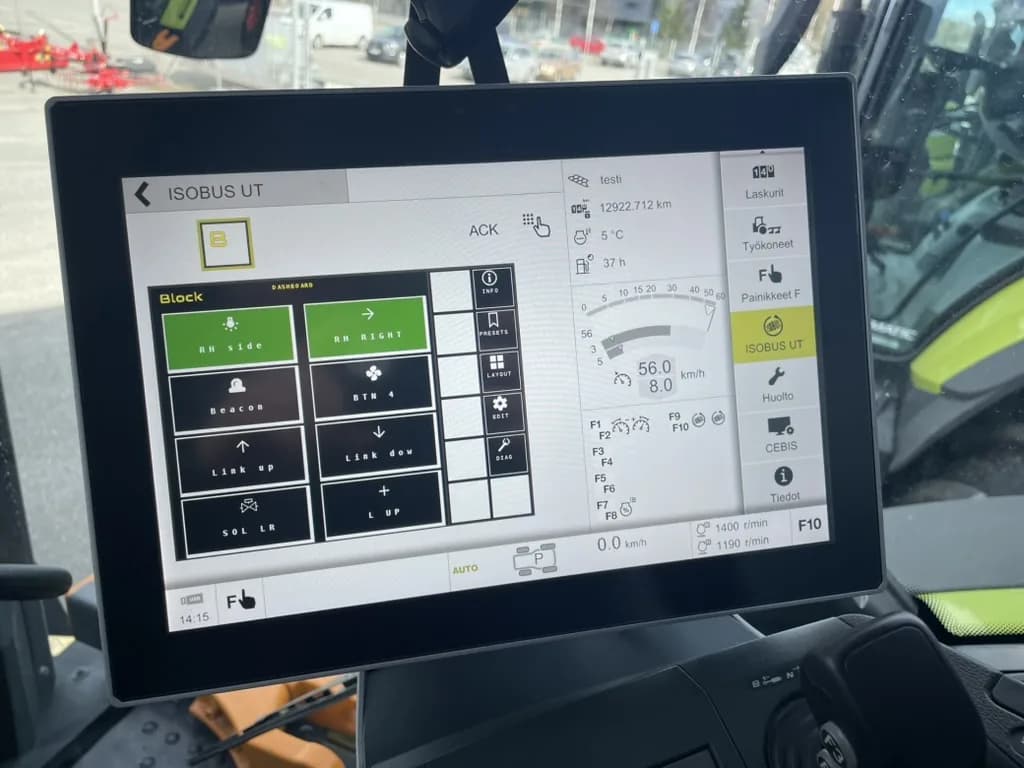
ISOBUS implement control lets you switch outputs on an implement (hydraulic solenoids, work lights, diverter valves) directly from the tractor screen and armrest buttons you already have. No extra switches in the cab, no proprietary controllers.
Here's how it works and what hardware you need to set it up.
What Is ISOBUS Implement Control?
ISOBUS implement control is the ability to command electrical functions on an implement over the tractor's ISOBUS CAN network. The tractor provides the screen (Virtual Terminal) and the physical buttons (AUX-N). The implement, or a module mounted on it, executes those commands: switching relays, opening solenoid valves, activating work lights.
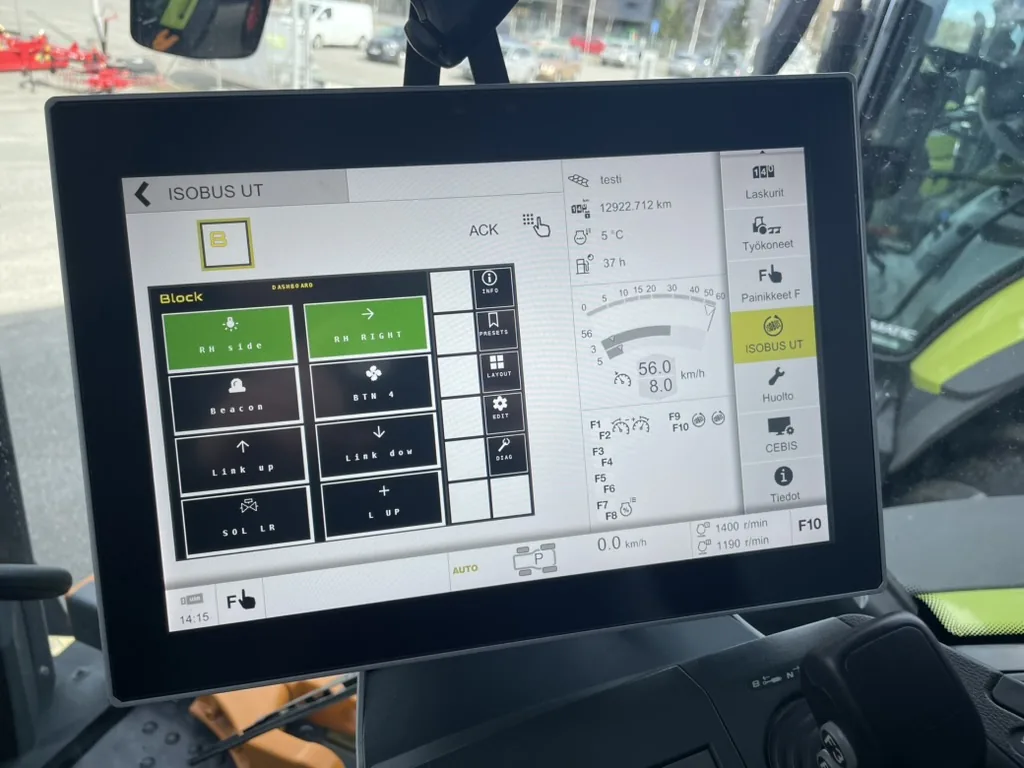
The standard is defined in ISO 11783 (parts 6 and 7). Any ISOBUS-certified tractor can communicate with any ISOBUS-certified implement, regardless of brand. That's the point of the standard: one cable, one screen, any combination.
The key difference from older systems: there's nothing proprietary to configure. The implement identifies itself on the bus, uploads its interface to the tractor screen, and the operator assigns buttons. Done once, remembered permanently.
How ISOBUS Implement Control Works
Three layers make up the system. Each layer has a distinct job.
Layer 1: Virtual Terminal (VT)
The Virtual Terminal is the tractor's ISOBUS display: the screen in the cab. When an implement connects to the ISOBUS network, it uploads its interface (an object pool) to the VT. The tractor renders buttons, status indicators, and navigation exactly as the implement defines them.
You press a soft key on the VT screen. The terminal sends a CAN message to the implement. The implement acts on it and confirms the state change. The screen updates. That's the complete loop.
For more on how the VT layer works, see ISOBUS Terminal Solutions: VT, UT & Implement Control. For the protocol-level detail (object pools, mask types, VT versions), see ISOBUS Virtual Terminal Explained.
Layer 2: AUX-N Physical Buttons
AUX-N (Auxiliary Input Type N, ISO 11783-6) extends implement control to the tractor's physical inputs: joystick buttons, armrest switches, thumbwheels. You assign an implement function to a physical button once, and the tractor stores that assignment.
From then on, pressing the button activates the function regardless of which implement's screen is currently shown. You don't have to navigate menus mid-operation.
The ISOBUS AUX-N Complete Guide covers the assignment process in detail, including per-brand menu navigation.
Layer 3: The Implement-Side Device
On the implement, something has to execute the commands coming from the tractor. On modern purpose-built implements this is built in. On older implements, or custom setups, you add a relay module, an ISOBUS gateway or an ECU that speaks ISOBUS. It receives the CAN message, switches the relay, and the electrical load activates. In AUX-N terms that module is the auxiliary function provider; both halves of an ISOBUS auxiliary device are covered separately. If you are still working out which kind of machine you have, the differences between ISOBUS and non-ISOBUS implements are set out side by side, cab and machine.
The relay is what handles the current. The solenoid valve, work light, or motor connects to the relay, not to the ISOBUS cable directly.
What You Can Control
If a load runs on 12V or 24V and needs switching, a relay module can handle it via ISOBUS. Common load categories:
| Category | Practical examples |
|---|---|
| Hydraulic solenoids | Diverter valve for front loader third function, section valves on sprayer booms, lock valves |
| Work lights | Front and rear working lights on implements, under-frame lighting, spot lights |
| Beacon lights | Warning beacons on road-transport position, rotating amber |
| Electric motors | Conveyor drives, fan motors, auger drives |
| Locking solenoids | Toolbar fold locks, hitch locks, gate actuators |
| Auxiliary functions | Air solenoids, proportional valve pilots, electric PTO engagement |
The relay module handles the electrical load. ISOBUS carries the control signal. High currents never pass through the bus itself.
For a worked example using work lights, see How to Install Work Lights Using ISOBUS and AUX-N. For the complete wiring and button-assignment walkthrough covering any 12V or 24V load, see Control Any Device from Your ISOBUS Terminal. For one where a flap sensor drives an output after the operator arms it, see a conveyor head run from two outputs and one sensor.
Hardware You Need
Three things are required on each side of the connection.
Tractor side:
- ISOBUS Virtual Terminal (standard on most tractors from around 2010 onwards)
- AUX-N support for physical button assignment (standard on tractors with a full ISOBUS armrest from around 2012–2015 onwards)
- An ISOBUS socket: either the in-cab ISOBUS connector or the rear external ISOBUS connector
Implement side:
- A relay module or ECU that speaks ISOBUS, wired to your electrical loads
- An ISOBUS cable connecting the module to the tractor socket
The ISOBUS connector is standardized across tractor brands. The same physical 9-pin connector fits Fendt, John Deere, Valtra, Case IH, CLAAS, Massey Ferguson, New Holland, and others. For the full pin assignment, see the ISOBUS Connector Pinout Guide.
No external power supply is needed. The module draws power through the ISOBUS connection itself.
Using ISOBUS Block for Implement Control
ISOBUS Block is an 8-channel relay module built for this exact use case. It connects to the tractor's ISOBUS network, appears on the Virtual Terminal, and gives you eight independent relay outputs, CH1 through CH8, controlled from the tractor screen and joystick buttons.
Each channel runs in either TOG (toggle) or MOM (momentary) mode, set from the VT. Toggle suits continuous loads like work lights. Momentary suits hydraulic valves where you want the relay active only while the button is held.
You can group outputs: one button press can activate CH3 and CH5 together. This is useful when a diverter valve and a work light should operate in sync.
Installed on the implement. Out on the frame the module needs an IP65 enclosure. Its own DIN-rail housing is IP20. Bolt the box to the implement frame, wire your loads to the relay terminals (NO/COM/NC per channel), run a cable to the tractor's rear external ISOBUS connector, and assign buttons on the tractor screen. The External Connector Kit supplies the connector for that cable: the standard ISO 11783-2 ISOBUS plug that goes into the tractor's external socket, sealed to IP67 when mated, with its contacts; they ship loose, so you crimp them onto your own wiring. One cable to the tractor. Works with any ISOBUS tractor you hook it up to.
This makes it practical for older implements: you don't need to replace the implement or buy a new one with ISOBUS built in. Mount the module on the implement, wire it up, and it appears on the screen of any ISOBUS tractor you connect it to. For what retrofitting an older implement with ISOBUS control costs and what the tractor needs, see the ISOBUS retrofit guide.
Specs: 8 relay channels, 10A per channel, 7–36V DC supply, −30°C to +50°C operating range.
Step-by-Step: Set Up ISOBUS Implement Control
This sequence covers a relay module installed on an implement, plugged into the rear external ISOBUS connector.
- Wire your loads to the relay terminals. Connect each electrical device (solenoid, light, motor) to the COM and NO terminals of the channel you want to use (CH1–CH8). One load per channel, or grouped if your module supports it.
- Plug the ISOBUS cable from the module into the tractor's rear external ISOBUS connector. CAN, power, and ground all come through this one connection.
- Start the tractor. Wait for the module to appear on the Virtual Terminal, typically 10–30 seconds on first connection while the object pool uploads. The VT caches the pool; subsequent connections are faster.
- Set channel modes on the VT. For each active channel, choose TOG or MOM. Set grouped outputs if you want a single button to activate multiple channels.
- Open the AUX-N menu on your tractor (found in ISOBUS settings; location varies by brand). Assign each channel function to the joystick button or armrest switch you want to use.
- Test from both the VT soft keys and the assigned physical buttons. Confirm each load activates and returns to its off state correctly.
The tractor stores your AUX-N assignments. The module stores your channel configuration. Both persist across power cycles.
Frequently Asked Questions
What is ISOBUS implement control?
ISOBUS implement control is the ability to switch electrical functions on an implement (solenoid valves, work lights, relay outputs) from the tractor's existing screen and buttons, over the ISOBUS CAN network. No extra cab switches, no proprietary display. The implement sends its interface to the tractor screen and the operator controls it from there.
Which tractors support ISOBUS implement control?
Any tractor with an ISOBUS-certified Virtual Terminal. Most major brands (John Deere, Fendt, Valtra, Case IH, New Holland, CLAAS, Massey Ferguson, Deutz-Fahr, Kubota) have supported ISOBUS VT from around 2010 onwards. For AUX-N button assignment, the tractor also needs AUX-N support, standard on machines with a full ISOBUS armrest from around 2012–2015 onwards. Check your tractor's documentation, the terminal maker's compatibility list and the implement maker's spec sheet to confirm.
Do I need a separate display for ISOBUS implement control?
No. The relay module or implement ECU uploads its interface to the tractor's existing Virtual Terminal. You use the screen already installed in the cab. If your tractor lacks a VT, aftermarket ISOBUS displays (Müller, Topcon, Reichhardt, and others) can add this capability by plugging into the in-cab ISOBUS connector.
Can I add ISOBUS control to an older implement?
Yes. Mount a relay module in a weatherproof enclosure on the implement, wire your solenoids and lights to the relay channels, and connect the ISOBUS lead to the tractor's rear external connector. The implement gains ISOBUS implement control without any modification to the implement's existing hydraulics or mechanics. The module handles the control side. Hydraulic hoses stay as-is. What a relay module does and does not convert on a non-ISOBUS implement is covered in full in ISOBUS vs non-ISOBUS implements.
What's the difference between ISOBUS implement control and AUX-N?
ISOBUS implement control is the broader concept: operating implement functions from the tractor's ISOBUS system, using both the on-screen VT soft keys and physical AUX-N buttons. AUX-N is specifically the physical input layer: it maps joystick and armrest buttons to implement functions so you can operate them without touching the screen. Both are part of the same ISO 11783-6 standard and work together. VT soft keys are always available; AUX-N adds the physical button option on top.
Can ISOBUS implement control switch hydraulic valves?
Yes, via relays that energise hydraulic solenoid valves. The relay module switches the solenoid's electrical coil; the solenoid opens the valve; hydraulic oil moves. The ISOBUS control chain stops at the relay and the solenoid. Everything downstream (hoses, cylinders, flow rates) is standard hydraulics. A single button press can open a diverter valve for a front loader third function or activate a section valve on a sprayer boom.
How many relay channels do I need for typical implement control?
It depends on the number of independent functions you need. A front loader with a diverter valve and two work lights needs three channels. A sprayer boom with eight sections needs eight. One relay channel per independently switched load is the rule. With an 8-channel module you can run most single-implement setups within one unit.
What happens to my button assignments if I connect the implement to a different tractor?
AUX-N assignments are stored in the tractor, not the implement. If you move the implement to a second tractor, you set up the button assignments once on that tractor, and it stores them from then on. Each tractor remembers its own layout independently.
Need an ISOBUS relay module for controlling solenoids, work lights, or hydraulic valves? ISOBUS Block provides 8 relay outputs controlled directly from your tractor's Virtual Terminal display. For specs, kit options, and pricing, see the ISOBUS Block product overview. Installation and setup questions are covered on the FAQ page.