Wiring Guide
Connection diagrams and wiring examples for ISOBUS Block
Wiring Guide
Before You Wire
- Disconnect the battery, or pull the fuse on the supply you are wiring, before you touch the terminals.
- Fuse every load circuit. Each channel switches up to 10A; the module does not protect the circuit for you.
- Fit spark suppression on inductive loads — solenoid valves, motors, clutches, contactors. See Spark Suppression on Inductive Loads below. This is a required part of the installation, not a recommendation.
- Do not put a relay output on any function where an unintended switch-on can injure someone or damage the machine. Relay contacts can fail closed.
- When the install is finished, park the machine, keep people clear, and test every channel. Check that the tractor's own systems still behave normally before you work with it.
Terminal Layout
The ISOBUS Block has screw terminals for all connections. Refer to the labels on the enclosure.
Power Supply
The module is powered through the ISOBUS connection itself — CAN and module power arrive over the same connector. The relay loads draw from a supply you provide (the tractor battery or another 12/24V source). The BAT+/BAT- screw terminals are available for bench testing or for feeding the module directly when not wiring through ISOBUS.
| Terminal | Connection |
|---|---|
| BAT+ | Positive supply (7-36V DC) |
| BAT- | Ground / Negative |
Important: Verify polarity before connecting power.
Digital Inputs (IN1-IN8)
The module has 8 optocoupler-isolated inputs, each accepting 5-36V. Wire a sensor or switch to an input and it can switch the relay outputs for you. See Automation (AUTO) for what the inputs do and how they are set up.
The inputs are optional. If you only want to switch the relays by hand from the Virtual Terminal buttons, AUX-N armrest/joystick buttons, or the web interface TEST function, leave the input terminals unwired and the module works exactly as before.
Switch Input (Dry Contact)
BAT+ ----[Switch]---- INx
When switch closes, input activates.
Voltage Signal (Wet Contact)
Signal+ (5-36V) ---- INx
Signal- ---- BAT-
When voltage is present, input activates.
Sensor with Open Collector (NPN)
Sensor Output ---- INx
BAT+ ---- Sensor Power
BAT- ---- Sensor Ground
Relay Outputs (CH1-CH8)
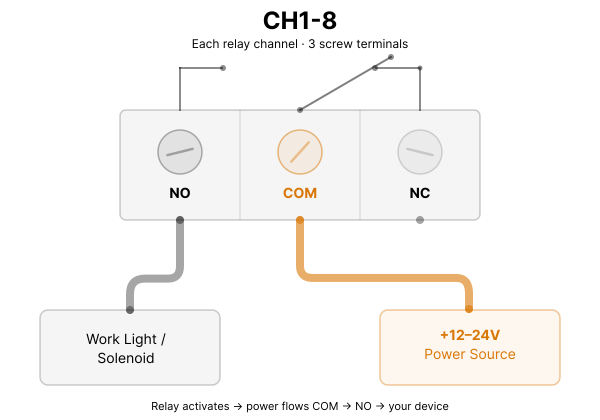
Each relay has three terminals:
| Terminal | Function |
|---|---|
| COM | Common (connect to power source) |
| NO | Normally Open (closed when relay ON) |
| NC | Normally Closed (open when relay ON) |
Spark Suppression on Inductive Loads
Solenoid valves, motors, clutches and contactors are inductive. When the relay opens, the coil's collapsing field throws a voltage spike back across the contacts. Left unsuppressed, that spike erodes the contacts and can weld them shut — and a welded contact leaves the output stuck ON.
Suppression goes at the load, not at the module. The module does not do it for you.
Most Hirschmann-style valve connectors (DIN 43650) already have a suppression diode or varistor inside. Check what you have before adding anything:
- An LED, or a diode symbol printed on the housing → suppression is built in. Nothing to add.
- No markings, or you are not sure → check it with a multimeter in diode mode. A suppressed connector reads a diode drop one way and open the other. A plain one reads open both ways.
For a DC load on a plain connector, fit a flyback diode across the coil terminals, banded end (cathode) to the positive side:
CH1 NO ----- Load+ ---+--- diode cathode (band)
                      |
                   [ coil ]
                      |
Power- ----- Load- ---+--- diode anode
Use a diode rated for at least the coil current and at least twice the supply voltage. A varistor across the coil works as an alternative.
Fit it backwards and the diode shorts the supply the moment the relay closes. Band to Load+.
Relay damage caused by missing spark suppression is not covered by the warranty. See Warranty Terms.
Typical Load Wiring (Normally Open)
Power+ ---- COM
NO ---- Load+
Load- ---- Power-
Load turns ON when relay activates.
Typical Load Wiring (Normally Closed)
Power+ ---- COM
NC ---- Load+
Load- ---- Power-
Load turns OFF when relay activates.
CAN Bus (ISOBUS)
| Terminal | Connection |
|---|---|
| CAN_H | CAN High (to ISOBUS CAN_H) |
| CAN_L | CAN Low (to ISOBUS CAN_L) |
| CAN_GND | CAN Ground (optional shield) |
ISOBUS In-Cab Connector Pinout
The in-cab ISOBUS connector is a 9-pin socket. ISOBUS Block connects to four of its pins:
- Pin 2: CAN_L
- Pin 4: CAN_H
- Pin 7: BAT+ (12V or 24V)
- Pin 9: GND
The remaining pins carry the tractor's internal CAN bus, cable shield, and grounds, and are not used by the module.
CAN Termination
If the ISOBUS Block is at the end of the CAN bus, enable the 120Ω termination resistor via the onboard jumper/solder bridge. Check your tractor's ISOBUS documentation for termination requirements.
Wiring Best Practices
1. Use appropriate wire gauge
- Power supply: 1.5mm² or larger for main power
- Relay loads: Size according to load current
- Inputs/CAN: 0.5-1.0mm² is typically sufficient
2. Protect with fuses
- Fuse the main power supply
- Fuse high-current relay loads individually
3. Route cables properly
- Keep CAN bus cables away from high-current/noisy wiring
- Use twisted pair for CAN_H and CAN_L
- Avoid routing near ignition systems or PWM controllers
4. Use proper connectors
- Crimp terminals for screw terminals
- Weatherproof connectors for external connections
- Secure all connections against vibration
Example: Work Light Control
Work Light Load (12V):
  +12V ---- CH1 COM
  CH1 NO ---- Light+
  Light- ---- GND
Assign a VT button to CH1. When you press the button (on the screen or an AUX-N armrest button), the CH1 relay closes and the light turns on. The load's +12V comes from your own supply; the relay only switches it.
Example: ISOBUS Connection
Tractor ISOBUS (in-cab connector):
  Pin 2 (CAN_L) ---- CAN_L terminal
  Pin 4 (CAN_H) ---- CAN_H terminal
  Pin 7 (BAT+)  ---- BAT+ terminal
  Pin 9 (GND)   ---- BAT- terminal
CAN and module power both arrive over the ISOBUS connection — no separate power wiring is needed for the module.