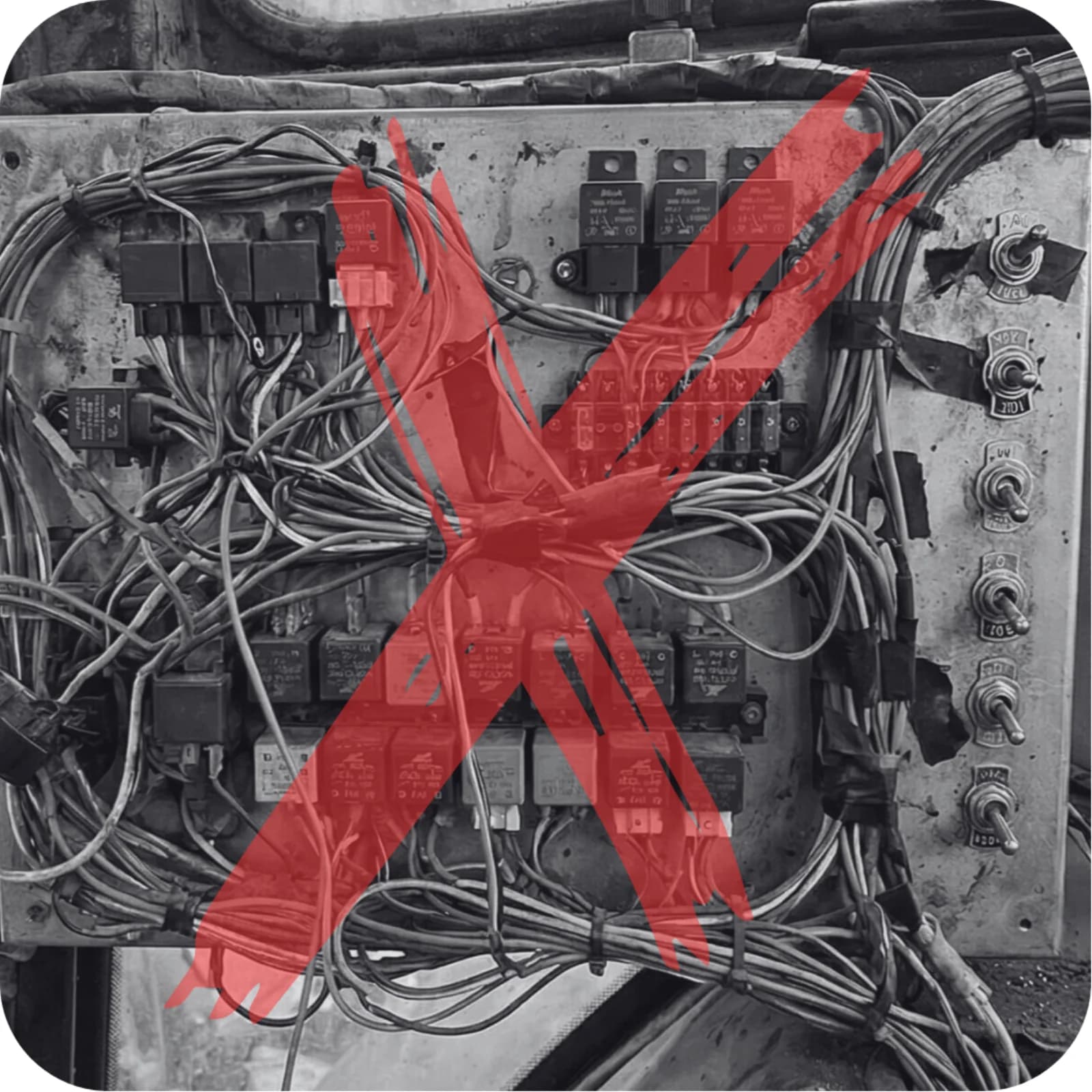
ISOBUS is the common standard that lets a tractor and an implement from different brands talk to each other: one plug at the back, the implement's controls on the tractor's own screen, and its functions on the tractor's own joystick. The official name is ISO 11783. Before it, every implement came with its own control box, its own cable through the back window and its own switches bolted to the cab pillar. With ISOBUS, a sprayer, a baler or a seed drill brings its interface with it and borrows the tractor's.
ISOBUS in one paragraph
ISOBUS is a set of rules, published as ISO 11783, for how electronics on a tractor and an implement share one cable and one screen. The implement carries its own control unit. That unit plugs into the tractor's ISOBUS socket, announces itself on the bus, and sends its operating screens to the tractor's terminal. The operator runs the implement from that terminal and from the tractor's joystick. Underneath, ISOBUS is a CAN bus running at 250 kbit/s, with agricultural rules layered on top. Most operators never need more networking detail than that.
The plug: one 9-pin connector on every brand
ISOBUS defines two connectors, both in ISO 11783-2:
- The rear external ISOBUS connector. The round socket on the back of the tractor, usually near the hitch and the hydraulic couplers, often behind a flip-up cap. This is where an implement plugs in. Some tractors have a front one as well.
- The in-cab ISOBUS connector. A 9-pin socket inside the cab, used for terminals, control boxes and anything else that lives next to the seat.
Both are the same design on every brand. An ISOBUS plug from a Kverneland sprayer fits a Valtra, a John Deere or a Fendt without an adapter. The external connector carries the bus, power for the implement's electronics, and a heavier supply for its loads.
Pin functions for both sockets are laid out in the ISOBUS connector pinout guide. If you need to buy a mating plug or fit one to a cable, the ISOBUS connector buying guide covers part numbers and types.
The screen: Virtual Terminal (VT) or Universal Terminal (UT)
The Virtual Terminal is the screen in the cab that shows the implement's controls. ISO 11783 calls it the Virtual Terminal. The AEF, the industry body behind ISOBUS testing, calls the same function UT, for Universal Terminal. Same thing, two names.
The trick is that the terminal knows nothing about your implement in advance. When the implement connects, it uploads a package of screens, buttons, icons and numbers called an object pool. The terminal draws whatever the implement sends. A sprayer shows boom pressure and section buttons. A baler shows bale count and knife status. Unplug one, plug in the other, and the screen changes to match.
The terminal can be built into the tractor's armrest display or be a separate screen mounted in the cab. Either way, one screen replaces the separate control box every implement used to need. The Virtual Terminal guide goes deeper into VT versions and object pools, and ISOBUS terminal solutions compares built-in and standalone terminals.
The buttons: AUX-N
AUX-N puts implement functions on the tractor's physical buttons: joystick triggers, armrest switches, rocker buttons. The implement publishes a list of functions. You open the AUX-N assignment menu on the terminal and pair each function with a button. The tractor remembers the pairing.
Result: fold the boom, open a valve or switch a work light without taking your eyes off the headland. AUX-N replaced an older scheme called AUX-O, and most tractors that assign buttons today do it the AUX-N way. Assignment steps and brand-by-brand quirks are in the AUX-N complete guide.
Documentation and section control: the Task Controller
The Task Controller is the part of ISOBUS that records work and steers the implement by position. It usually lives inside the tractor's terminal. It comes in three functionalities, and spec sheets list them separately.
TC-BAS (basic). Records totals for a job: area worked, product applied, time spent. Task data goes in and out as files that farm management software can read. This is documentation, not control.
TC-GEO (geo-based). Adds position. Work is recorded against where it happened, so you get as-applied maps out, and a prescription map can set the rate by location as you drive. This is where variable-rate application lives. It needs a GPS receiver feeding the Task Controller.
TC-SC (section control). Switches implement sections on and off by position. The sprayer's boom sections or the drill's rows shut off as they cross ground already covered and come back on when they reach clean ground. Less overlap on every headland. Both the tractor side and the implement side must support it. The section control guide covers what a working setup needs.
What the tractor tells the implement: TECU
The Tractor ECU, or TECU, is the tractor's own voice on the bus. It broadcasts what the implement needs to know about the tractor: ground speed, wheel speed, PTO speed, rear hitch position and similar values. A spreader uses ground speed to hold its rate. A baler can read PTO speed. A drill can use hitch position to know when it is lifted at the headland.
A related AEF functionality, TIM (Tractor Implement Management), goes the other way: the implement asks the tractor to do something, such as change speed or lift the hitch. It needs support on both machines and the operator's approval in the cab.
ISOBUS vocabulary
| Term | Plain meaning |
|---|---|
| VT / UT | The terminal screen in the cab that shows the implement's controls. VT is the ISO name, UT is the AEF name. |
| AUX-N | Assigning implement functions to the tractor's joystick and armrest buttons. |
| TC-BAS | Task Controller basic: records job totals like area and product used. |
| TC-GEO | Task Controller with position: as-applied maps and variable rate from prescription maps. |
| TC-SC | Task Controller section control: sections switch on and off by GPS position. |
| TECU | Tractor ECU: sends ground speed, PTO speed and hitch position to the implement. |
| ECU | Electronic control unit. The box of electronics on the implement (or tractor) that talks on the bus. |
| Object pool | The package of screens, buttons and icons an implement uploads to the terminal. |
| IBBC | Implement Bus Breakaway Connector: the standard name for the rear external ISOBUS socket. |
More on what an implement ECU does and what to specify: ISOBUS ECU for implements.
What "ISOBUS-ready" means on a spec sheet
Less than it sounds. Neither ISO 11783 nor the AEF defines "ISOBUS-ready", so it can mean an implement that ships with a working ECU and uploads its screens to your terminal, or one that only has a loom prepared for an ECU you still have to buy. The same goes for tractors: "ISOBUS-ready" might mean a socket at the back with no terminal in the cab.
Ask two questions. Does it come with the ECU fitted? Which functionalities does it support: UT, AUX-N, TC-BAS, TC-GEO, TC-SC? The ISOBUS vs non-ISOBUS implements post walks through what changes in the cab either way.
How to tell if your tractor has ISOBUS
Three signs, in order of how quickly you can check them:
- A 9-pin round socket at the rear. Look near the hitch and the hydraulic couplers, under a cap. No socket, no ISOBUS implement connection.
- An ISOBUS or UT menu on the terminal. The armrest display or cab screen has a page for implements, often shown with the ISOBUS logo. A socket without a terminal lets an implement talk to the tractor, but it cannot show you its screens.
- The spec sheet or the AEF database. Look for "ISOBUS", "ISO 11783", "UT" or "AUX-N" in the tractor's specification, or check the model in the database.
The ISOBUS tractor compatibility guide covers the details by brand and what you lose with each missing piece.
ISOBUS by brand
The standard means the same plug and the same screen protocol on John Deere, Fendt, Case IH, New Holland, CLAAS, Valtra, Massey Ferguson, Deutz-Fahr and Kubota. The terminals look different and the menus are named differently, but an ISOBUS implement uploads the same object pool to all of them. Where brands differ is in which functionalities each model supports and how each terminal lays out the AUX-N and Task Controller menus. To check a specific tractor and implement pairing, use the AEF ISOBUS database, which lists tested products and the functionalities each one carries.
What you can add yourself
ISOBUS is not only for implements that came from the factory with it. A relay module that speaks ISOBUS puts switched outputs on the tractor's screen and joystick: work lights, beacons, solenoid valves, diverter valves, small electric motors. The module uploads its own object pool, so each output shows up as a named button on the terminal and can be assigned to an armrest button through AUX-N.
That is what ISOBUS Block does: 8 relay channels at 10 A each, switched from the Virtual Terminal and AUX-N buttons. It works on the VT and AUX-N side only. It does not take part in Task Controller documentation or section control. The ISOBUS retrofit guide shows how to bring an older implement onto the tractor's screen this way.
When things do not work
Most ISOBUS problems come down to four things: the connection, the power, the bus, or a mismatch between what the implement asks for and what the terminal supports. The implement does not appear on the screen, the screen shows an old layout, an AUX-N button does nothing. Start with the ISOBUS troubleshooting guide. If the terminal shows a fault code, the ISOBUS fault codes guide explains how to read it.
For manufacturers
If you build implements and want them on the tractor's screen, the work is an ECU on the machine, an object pool designed for the terminal, and testing against real tractors. The OEM guide to making an implement ISOBUS-ready lays out the options. If you would rather hand the ISOBUS side to someone, ETERVO Oy, the company behind ISOBUS Block, develops and maintains the ECU software and the terminal screens for implement manufacturers. The OEM page describes that work.
Frequently asked questions
What does ISOBUS stand for?
ISOBUS is the common name for ISO 11783, the international standard for serial communication between tractors and implements. It is a label rather than a strict acronym: "ISO" for the standards body and "BUS" for the data network. Nobody at the dealer says "ISO 11783 compliant". They say ISOBUS.
Is ISOBUS the same as CAN bus?
No. CAN bus is the wiring and signalling that carries the messages. ISOBUS is built on top of CAN and adds the agricultural rules: how an implement uploads its screens, how buttons get assigned, how the Task Controller works, which connectors are used. Every ISOBUS network is a CAN network. Not every CAN network is ISOBUS.
What is an ISOBUS tractor?
An ISOBUS tractor has the rear external ISOBUS connector wired to the tractor's network and a terminal in the cab that can show an implement's screens. Many also support AUX-N button assignment and one or more Task Controller functionalities. A tractor with the socket but no terminal is only partly ISOBUS.
Do all new tractors have ISOBUS?
No. ISOBUS is common on mid-range and larger tractors and is often standard there, but on smaller and utility tractors it can be an option or missing entirely. Even where it is fitted, a model may support the terminal and not the Task Controller. Check the spec sheet or the AEF database for the exact model.
What is ISOBUS used for?
Running implements from the tractor's own screen and buttons. That covers setting and monitoring a sprayer, baler, spreader or drill on the terminal, assigning implement functions to the joystick, recording job data, and automatic section control and variable rate where both machines support it. It also lets you add your own switched outputs, such as work lights and valves, to the same screen.
Is ISOBUS compatible between brands?
Yes, that is its purpose. The plug and the screen protocol are the same across brands, so a Pöttinger loader wagon can run on a Case IH terminal and a Kuhn spreader on a Fendt. Compatibility still depends on functionality: if the implement needs TC-SC and the tractor does not have it, section control will not work. The AEF database shows which pairings have been tested.
Need an ISOBUS relay module for controlling solenoids, work lights, or hydraulic valves? ISOBUS Block provides 8 relay outputs controlled directly from your tractor's Virtual Terminal display.